
Understanding bot clicks, their impact, and how to gain value from the bot click detection feature in WhatCounts.
Overview
The Bot Click Detection feature helps improve the accuracy of email engagement metrics by identifying and filtering non-human clicks generated by automated systems. These automated opens/clicks are commonly produced by email security gateways, anti-virus scanners, link protection services, and security bots that inspect links before an email reaches the recipient.
By detecting these automated interactions, marketers can:
-
Improve click reporting accuracy
-
Prevent inflated engagement metrics
-
Build more reliable audience segments
-
Make better automation and campaign decisions
-
Reduce false-positive engagement signals
The Bot Click Detection feature uses multiple detection techniques that work together to classify suspicious clicks.
Enable this in the platform
Customer care → Realm Management → Edit Realm → Bot Detection Settings: Enable Bot Detection
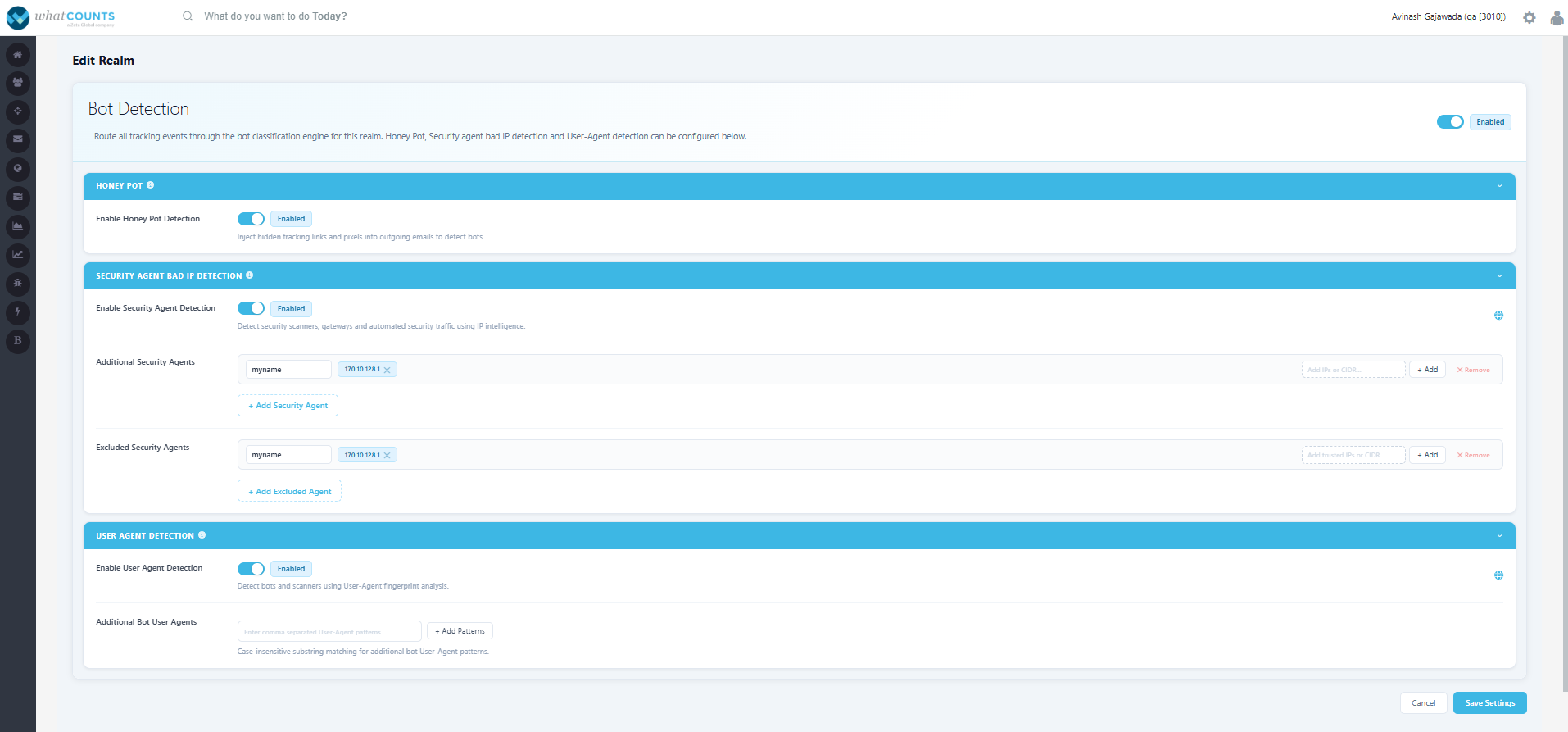
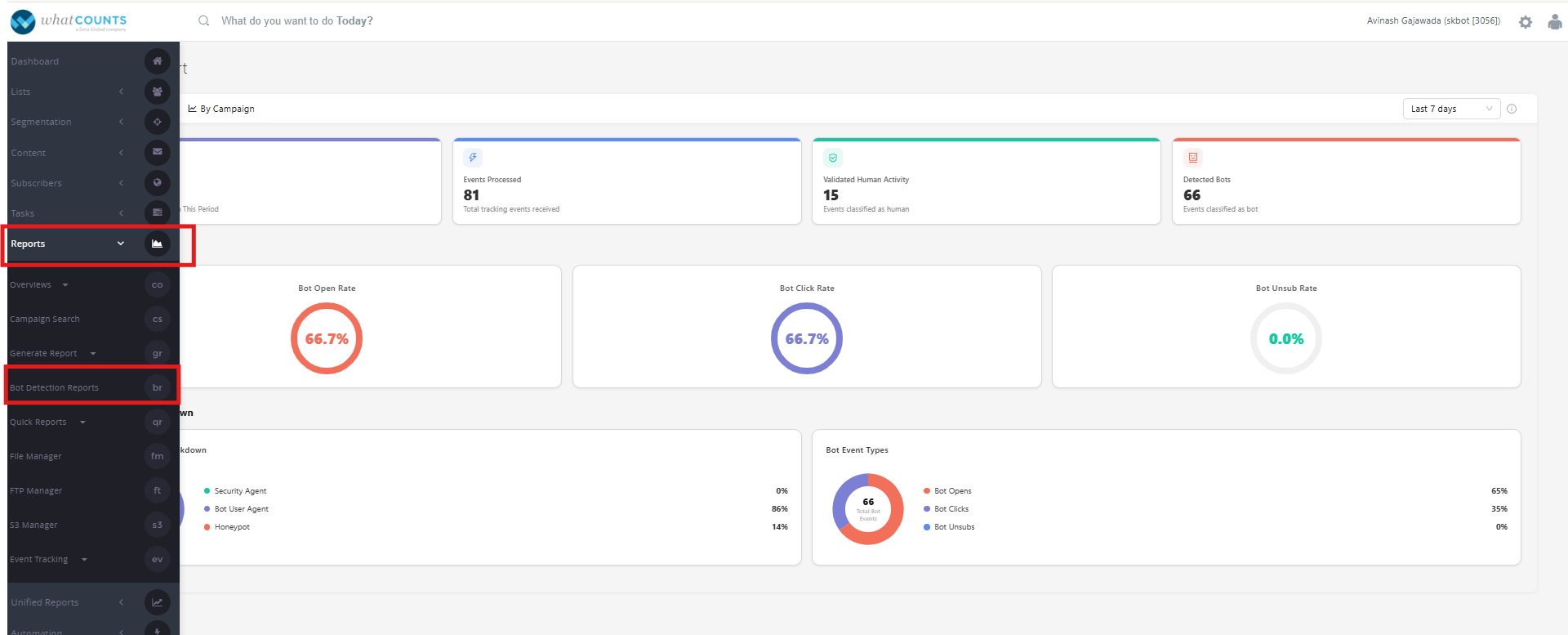
Once enabled, Bot Detection Report page will be enabled and visible under the Reports module, as shown in the screenshot below.
Detection Methods
1. Honey Pot Detection
What is Honey Pot Detection?
Honey Pot Detection identifies automated systems by embedding one or more hidden tracking links within an email. These links are intentionally invisible to human recipients but can still be accessed by automated scanners.
If a hidden link is clicked, the system identifies the interaction as bot-generated because legitimate recipients are not expected to interact with invisible content.
What is Injected
A hidden honeypot link is injected only when the realm honeypot is ON and the campaign has not disabled it.
|
Element |
Type |
Hidden By |
Purpose |
|
Honeypot Link |
<a> tag |
CSS display:none ( + fallbacks) |
Catches bots that follow all links |
Example format:
<html><div style=3D"font-size:0;line-height:0;display:none!important;">
    <a href=3D"http://awsclick.wcqa.us/hpt?c=3D16&r=3D3056&l=3D1&a=3D11&e=
=3D83DFD67C75D950DCDB0C5D33103A7A9D">.</a>
How it Works
-
A hidden tracking link is inserted into the email.
-
The link is not visible to recipients.
-
Security scanners inspect all links within the email.
-
If the hidden link is requested, the click is classified as a bot click.
-
The associated recipient activity is flagged for reporting.
Benefits
-
Detects automated security scanners before recipient interaction.
-
High confidence bot identification.
-
No impact on recipient experience.
-
Works independently of IP addresses or User Agents.
Example
|
Human Recipient |
Security Scanner |
|---|---|
|
Clicks only visible CTA |
Scans every link including hidden link |
|
Hidden link never accessed |
Hidden link requested |
|
Recorded as Human |
Recorded as Bot |
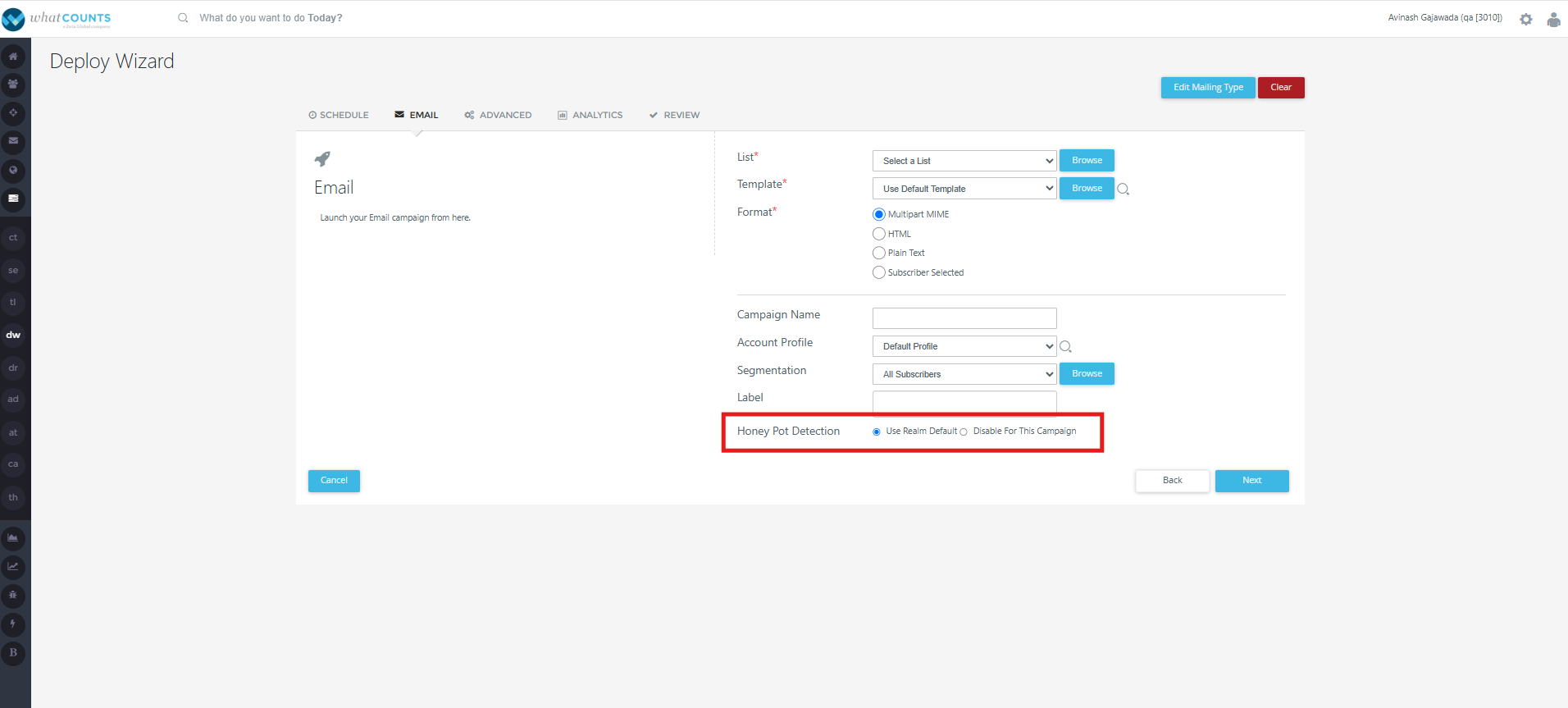
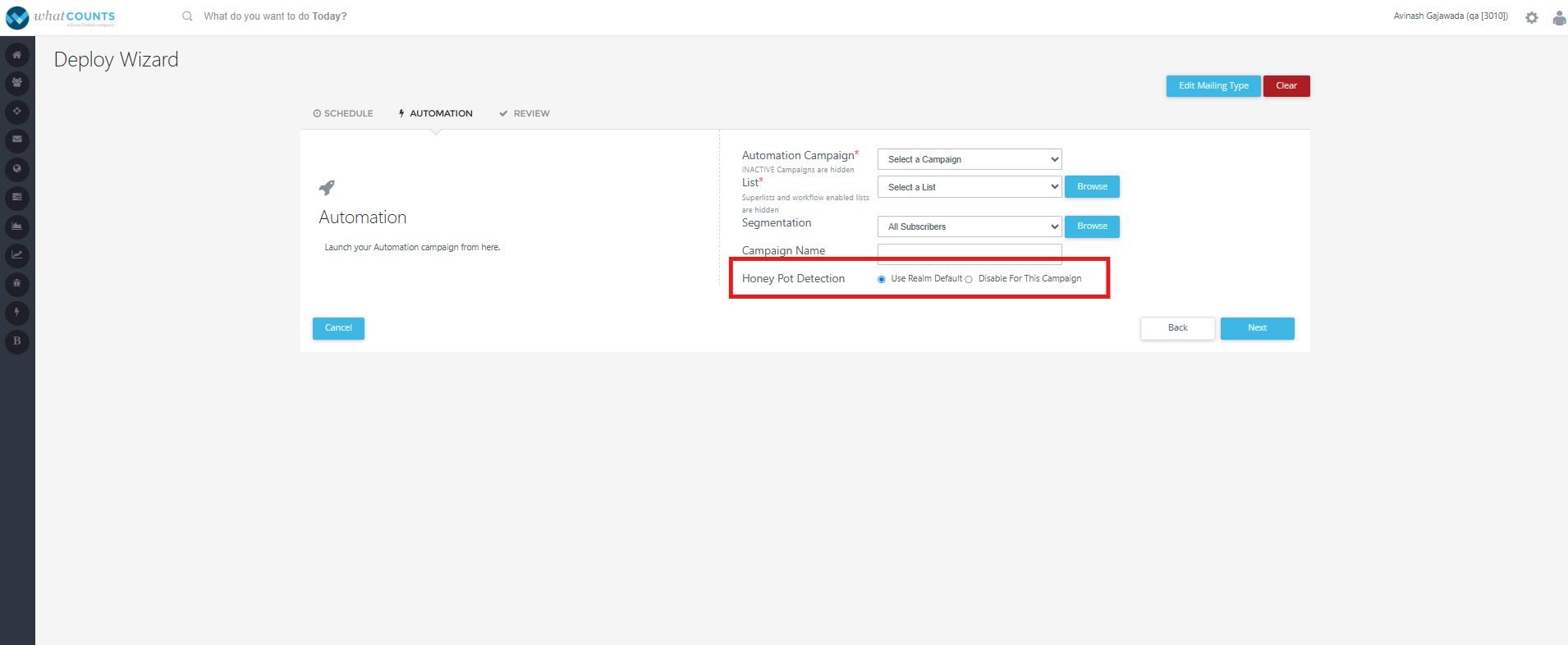
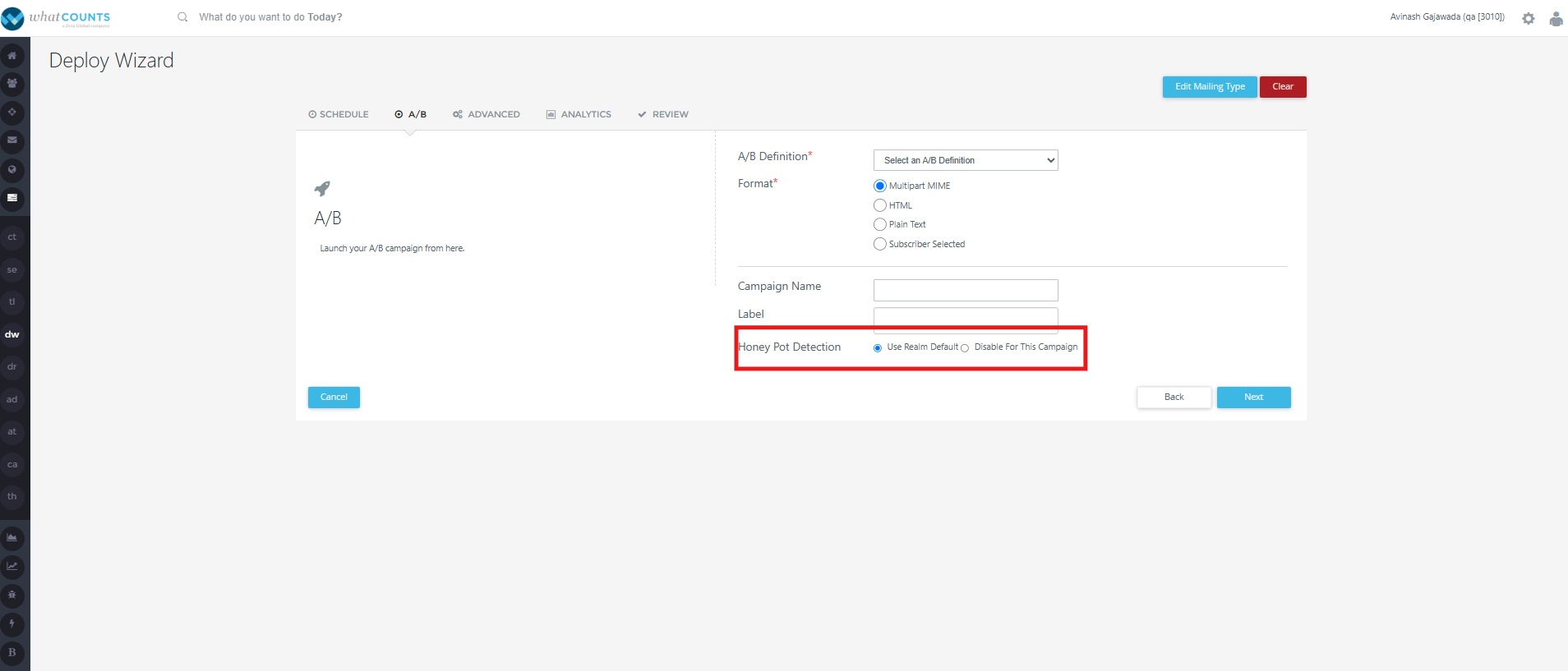
Usage of Honey pot detection URL is also configurable during Campaign/Automation deployments, in the areas outlined - as shown in the screenshots below:
-
Tasks → Deploy Wizard → Campaign → Normal list → Email tab.
-
Tasks → Deploy Wizard → Automation → Automation tab.
-
Tasks → Deploy Wizard → Campaign → A/B list → A/B tab.
2. Security agent bad IP detection.
What is Bad IP Detection?
Detects known security scanners, email gateways, and automated security traffic using IP intelligence and security-agent identification. Supports individual IP addresses, CIDR ranges, and wildcard patterns. Clicks originating from those IPs are classified as bot activity.
Example: A click from IP 40.94.x.x with agent "Microsoft Defender Safe Links" is classified as a bot/security scan instead of a genuine user click.
The platform maintains a list of security agents and IP ranges associated with:
-
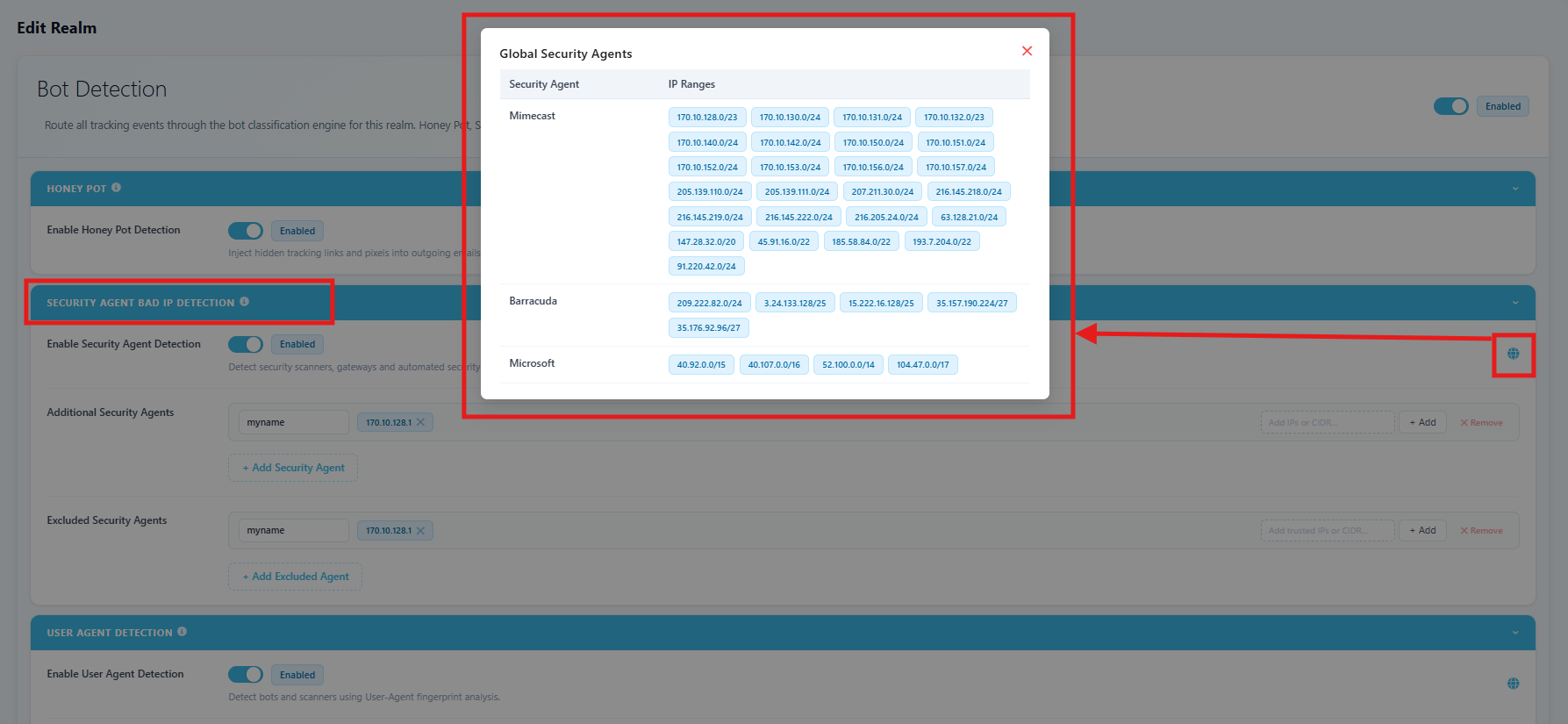
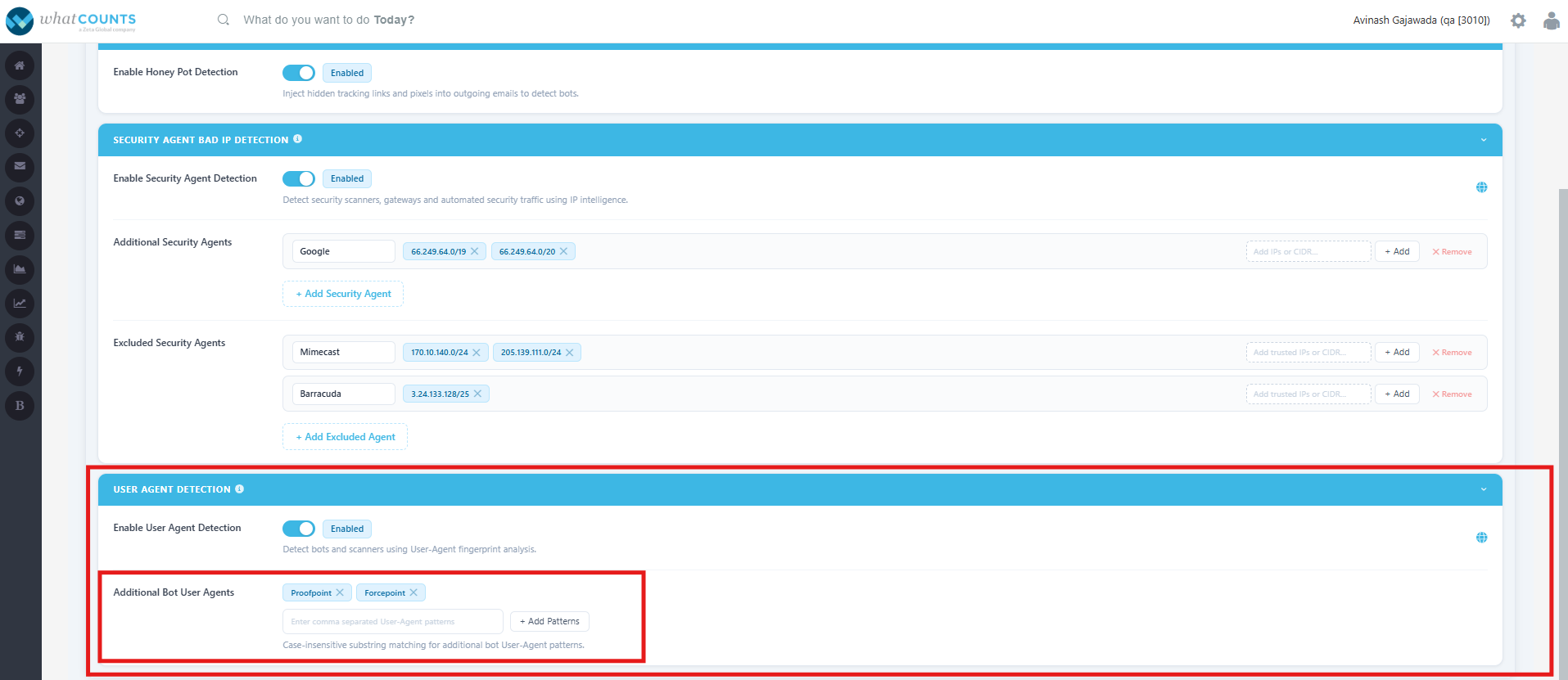
Following are the pre-defined security agents and respective IP Ranges. The same information is available in the realm settings, as shown in the screenshot below the table.
|
Security Agent |
IP Ranges |
|---|---|
|
Mimecast |
170.10.128.0/23 170.10.130.0/24 170.10.131.0/24 170.10.132.0/23 170.10.140.0/24 170.10.142.0/24 170.10.150.0/24 170.10.151.0/24 170.10.152.0/24 170.10.153.0/24 170.10.156.0/24 170.10.157.0/24 205.139.110.0/24 205.139.111.0/24 207.211.30.0/24 216.145.218.0/24 216.145.219.0/24 216.145.222.0/24 216.205.24.0/24 63.128.21.0/24 147.28.32.0/20 45.91.16.0/22 185.58.84.0/22 193.7.204.0/22 91.220.42.0/24 |
|
Barracuda |
209.222.82.0/24 3.24.133.128/25 15.222.16.128/25 35.157.190.224/27 35.176.92.96/27 |
|
Microsoft |
40.92.0.0/15 40.107.0.0/16 52.100.0.0/14 104.47.0.0/17 |
-
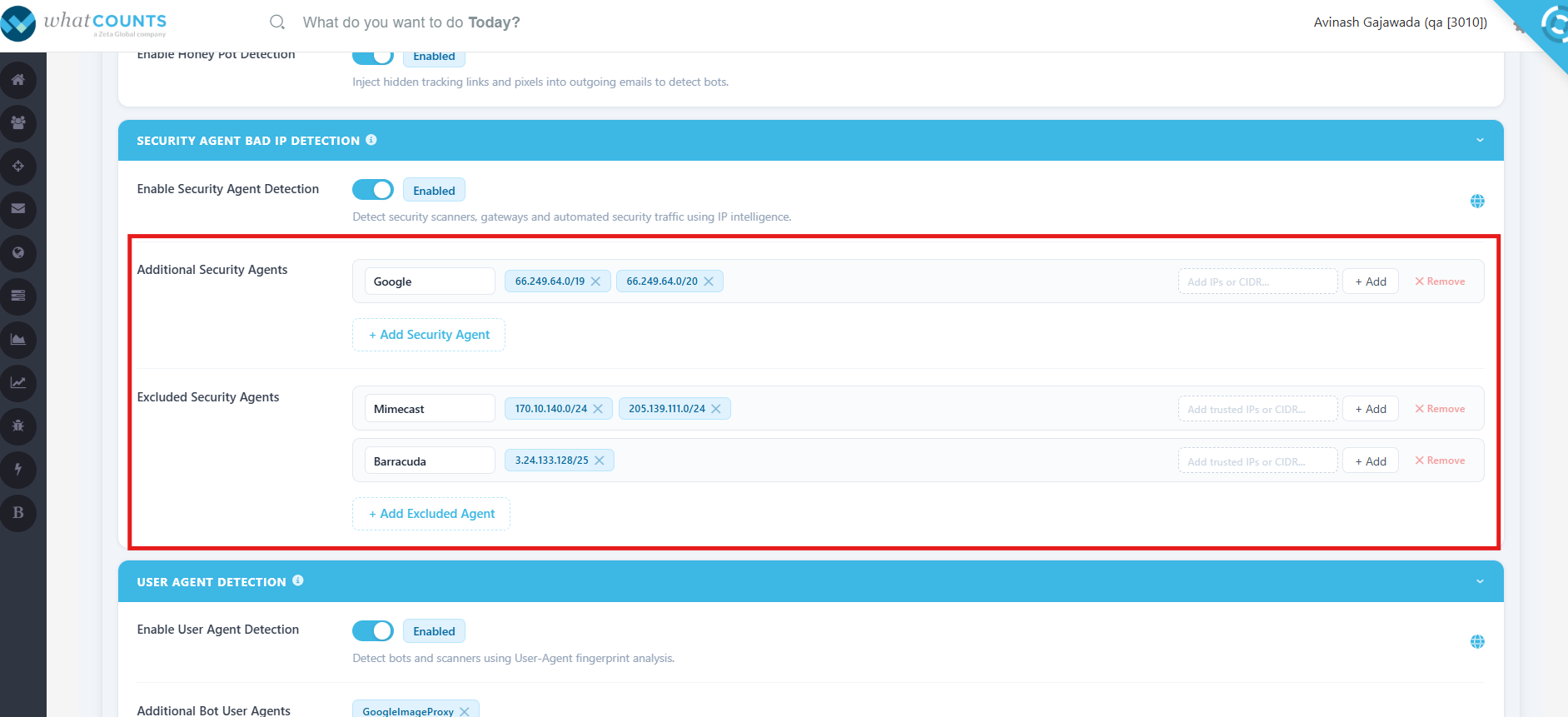
Super user or Private Label Admin can configure any additional security agents & associated IPs or exclude security agents & associated IPs, using the option as shown in the screenshot below.
How it Works
-
A click is received.
-
The sender IP is captured.
-
The IP is compared against the security agent IP database.
-
If the IP matches a known scanner, the click is classified as a bot click.
-
Reporting is updated accordingly.
Configuration supports:
-
Individual IP addresses
-
CIDR ranges
-
Wildcard/range-based IP patterns
-
Multiple entries per security agent
Example
|
Click Source |
Result |
|---|---|
|
Known Microsoft Defender IP |
Bot Click |
|
Known Agent and IP |
Bot Click |
|
Known excluded agent and IP |
Human Click |
3. User Agent Detection
What is User Agent Detection?
User Agent Detection identifies automated bots and security scanners by analyzing the User-Agent string included in every HTTP request. The User-Agent identifies the software or application making the request, such as a web browser, email security gateway, or automated scanning tool.
The platform performs case-insensitive substring matching against incoming User-Agent headers to detect known bot and security scanner signatures. Since automated security tools often use distinctive User-Agent strings that differ from standard web browsers, these requests can be accurately identified and classified.
For example, if a click contains a User-Agent such as "Mimecast" or "Barracuda", the platform classifies it as a bot or security scan rather than a genuine user click.
The platform maintains a list of user agents:
-
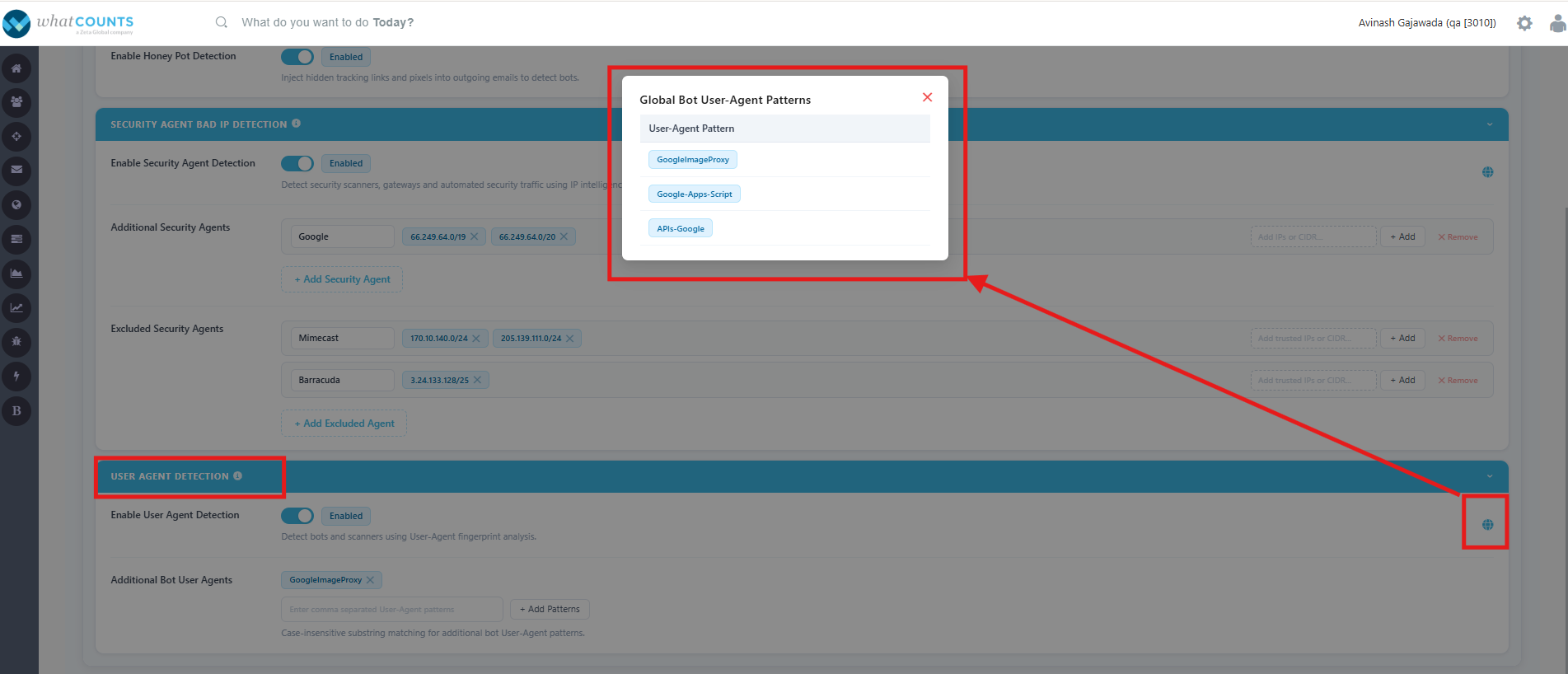
Following are pre-defined user agents, that are identified as Global Bot user-agent patterns.
|
S No |
User Agent Name/String |
|
1 |
GoogleImageProxy |
|
2 |
Google-Apps-Script |
|
3 |
APIs-Google |
-
Super user or Private Label Admin can configure any additional user agent strings, using the option as shown in the screenshot below.
How it Works
-
A click request is received.
-
The User-Agent string is extracted.
-
The value is compared against a library of known security scanner signatures.
-
Matching requests are classified as bot clicks.
Benefits
-
Detects automated agents even when IPs change.
-
Complements Honey Pot and IP detection.
-
Effective for identifying newly deployed security scanners.
-
Improves overall detection confidence.
Example
|
User Agent |
Classification |
|---|---|
|
Standard Chrome Browser |
Human |
|
Microsoft Safe Links Scanner |
Bot |
|
Security Inspection Agent |
Bot |
Security Agents Vs User Agents:
The two techniques detect different aspects of the incoming click request and are best used together rather than independently.
|
Security Agent Bad IP Detection |
User-Agent Detection |
|
Identifies clicks based on the source IP address. |
Identifies clicks based on the HTTP User-Agent string received. |
|
Checks whether the IP belongs to a known security scanner or email security provider (e.g., Microsoft, Proofpoint). |
Checks whether the response identifies itself as a security scanner, crawler, or automated client. |
|
Relies on maintained IP ranges or IP reputation. |
Relies on matching known User-Agent patterns. |
|
IP ranges can change frequently and require regular updates. |
User-Agent strings may change but are generally more stable and descriptive. |
|
Can miss detections if vendors use new or unknown IP ranges. |
Can miss detections if scanners spoof or omit the User-Agent. |
|
Useful for detecting requests from known cloud/security infrastructure. |
Useful for identifying the application making the request, regardless of IP. |
Example
Security Agent Bad IP Detection
Request received from:
-
IP:
40.107.25.100 -
This IP belongs to Microsoft Exchange Online Protection.
➡️ The click is classified as a suspected security scan based on the IP.
User-Agent Detection
Request received with:
User-Agent: Microsoft Office Existence Discovery
➡️ The click is classified as a suspected bot/security scan based on the User-Agent, even if the IP isn't on your known list.
Bot Detection work flow
-
This workflow outlines the process from email delivery to click classification, including various checks to identify bot clicks.
Step 1: Email Delivered
Step 2: Click Received
|
Check |
Outcome |
Action |
|---|---|---|
|
Honey Pot Triggered? |
Yes |
Bot Click |
|
Honey Pot Triggered? |
No |
Continue |
|
IP Reputation Check |
Known Security IP |
Bot Click |
|
IP Reputation Check |
Not Known Security IP |
Continue |
|
User Agent Check |
Known Scanner |
Bot Click |
|
User Agent Check |
Not Known Scanner |
Human Click |
Step 3: Click Classification Stored & reflected in reports.
Detection Priority
The detection methods work together to provide comprehensive coverage:
|
Detection Method |
Purpose |
Priority |
|---|---|---|
|
Honey Pot Detection |
Identifies hidden-link interactions from automated scanners |
Very High |
|
Security Agent Bad IP Detection |
Detects requests from following
|
High First Priority Second priority Third priority |
|
User Agent Detection |
Identifies automated scanning software by signature |
High |
A click matching any of these detection methods is classified as a Bot Click.
Frequently Asked Questions (FAQs)
1. What is Bot Click Detection?
Bot Click Detection identifies and classifies automated clicks generated by email security scanners, antivirus software, and link protection services. It helps distinguish non-human interactions from genuine recipient clicks, providing more accurate engagement reporting.
2. Why should I enable Bot Click Detection?
Automated security scanners can inflate click metrics before a recipient opens an email. Bot Click Detection helps improve reporting accuracy by filtering these human vs non-human interactions.
3. How does Bot Click Detection identify automated clicks?
The feature uses multiple detection methods that work together:
-
Honey Pot Detection – Detects interactions with hidden tracking links.
-
Security Agent Bad IP Detection – Identifies clicks originating from known security scanner IP addresses.
-
User Agent Detection – Detects requests from known security scanner User-Agent signatures.
A click matching one or more of these methods is classified as a bot click.
4. Which types of automated clicks can Bot Click Detection identify?
Bot Click Detection is designed to identify clicks generated by email security gateways, antivirus software, link protection services, URL inspection tools, and other automated security agents that scan links before recipients interact with an email.
5. Does Bot Click Detection work for all email providers?
Yes. The feature works across all email providers. It is particularly valuable for organizations using enterprise email security solutions that perform automated link scanning before email delivery.
6. How does Bot Click Detection improve marketing performance?
By separating automated clicks from genuine recipient interactions, marketers gain more reliable engagement metrics, accuracy, and more trustworthy campaign performance reporting.
7. Can a single click match multiple detection methods?
Yes. A click may match more than one detection method—for example, it may originate from a known security IP address while also using a recognized scanner User-Agent. Multiple matches increase the confidence of the classification.
8. Will Bot Click Detection affect genuine recipient clicks?
No. The feature is designed to identify automated scanner behavior without impacting legitimate user interactions. Genuine clicks continue to be tracked and reported normally.
9. Does Bot Click Detection block or prevent security scanners from accessing links?
No. The feature does not prevent scanners from inspecting links. Instead, it identifies and classifies those interactions so they can be distinguished from genuine recipient engagement.
10. How does Bot Click Detection improve campaign reporting?
By separating human clicks vs non-human clicks, the feature provides more accurate click-through rates (CTR), engagement reports, and campaign performance insights.
11. Can detected bot clicks be excluded from reporting?
Yes. Detected bot clicks can be used to improve reporting accuracy.
12. Why does the platform use multiple detection techniques instead of just one?
No single detection method can identify every type of automated scanner. Combining Honey Pot Detection, Security Agent Bad IP Detection, and User Agent Detection provides broader coverage, higher detection accuracy, and more reliable classification across different email security solutions.