
Overview
The French Data Protection Authority (CNIL) published its final recommendation on 14 April 2026, clarifying that email tracking pixels used to measure recipient opens are subject to privacy requirements similar to cookies in many marketing scenarios. The recommendation explains when consent is required for email open tracking and encourages marketers to provide recipients with greater transparency and control over how user engagement data is collected.
To help marketers of France and Italy city [EU Nations] align with evolving CNIL privacy requirement, the platform provides a realm-level Disable Open Activity Tracking feature to control whether an email tracking invisible 1*1 pixel to be included in campaign and automation emails.
How It Works
A simple configuration option is available to enable or disable email open tracking:
-
Disable Open Activity Tracking Enabled: The platform excludes the email tracking pixel in all outgoing emails sent through the realm, regardless of the pixel's inclusion at the list level. As a result, email open activity will not be recorded or shown in all report pages.
-
Disable Open activity Tracking Disabled (Default): The platform includes the email tracking pixel in all outgoing emails. As a result, email open events are recorded and made available in all report pages.
Applies To
This setting applies to:
Tasks → Deploy Wizard:
-
Email Campaign
-
Normal.
-
A/B.
-
-
Automation Campaigns.
-
Automation 2.0 Campaigns.
Content → Template → Add/Edit template → Deploy Campaign.
Campaign/Automation Behavior
When Disable Open activity tracking is Disabled
The email includes:
-
Open tracking pixel
-
Open events
When Disable Open activity tracking is Enabled
The email excludes:
-
Open tracking pixel
-
Open event collection
And Other tracking methods, such as click tracking, continue to work if configured.
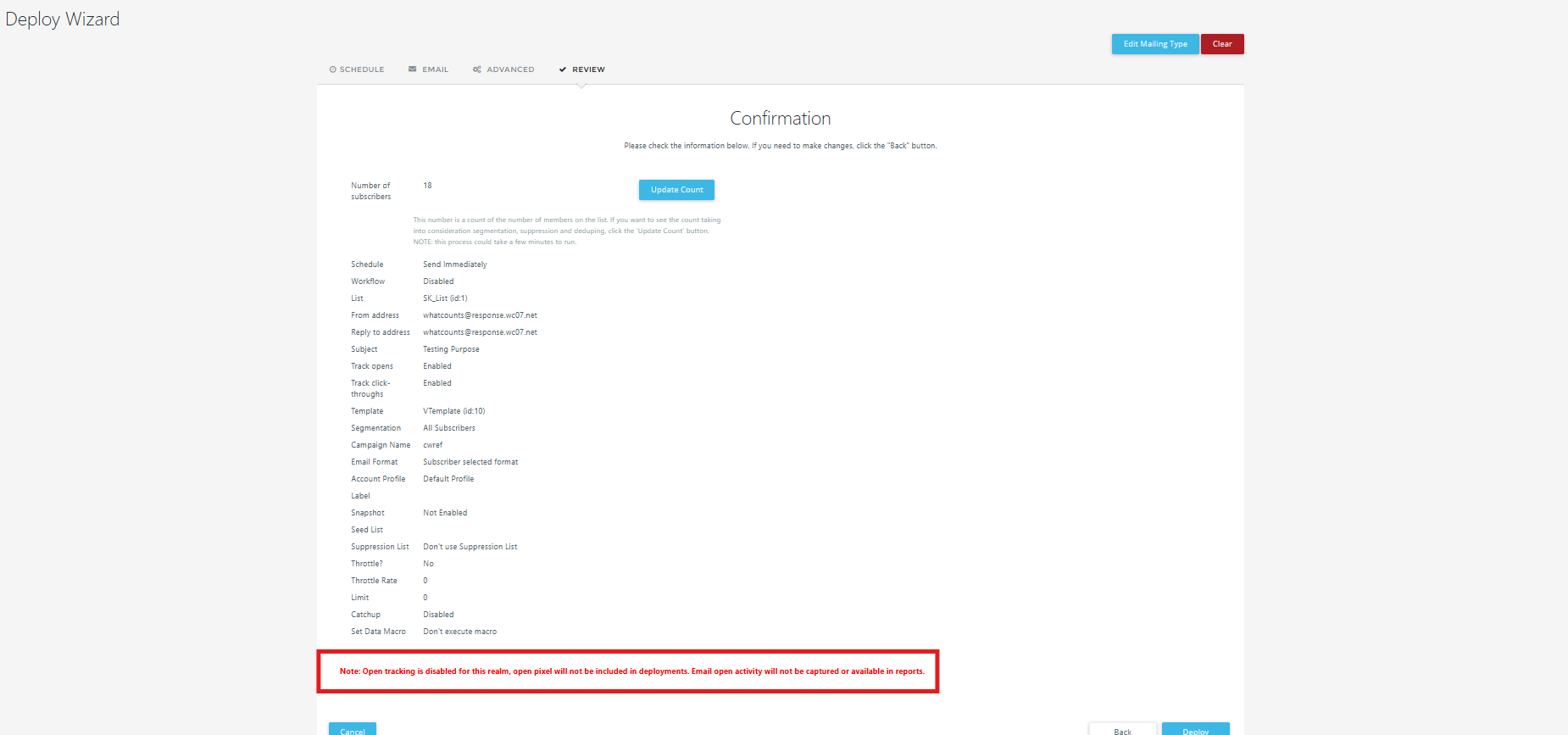
During Campaign/Automation creation,
-
In the Review tab - you’ll see an information in red colored font, as referenced in the following screenshot.
Important Notes
-
The setting applies to emails sent after activation and does not change past campaign data.
-
Enabling or disabling this option affects only email open tracking, not delivery.
-
Click tracking and other configured tracking capabilities remain unaffected unless configured separately.
-
Marketers must configure this setting to comply with CNIL privacy laws and internal policies, of EU nation, especially for France from and Italy from October 2026.
Frequently Asked Questions
1. Why did my open rate decrease?
Open tracking is performed only for recipients who are eligible under your configured compliance rules. This may reduce the number of recorded opens.
2. Does this affect click tracking?
No. Click tracking is independent of email open tracking and continues to function according to your account configuration and applicable privacy requirements.
3. Can I disable this feature?
Yes. Super User and Private Label Admin can enable or disable CNIL compliance based on organizational requirements, unless it has been enforced by your organization's compliance policy.
4. Are historical campaigns affected?
No. The feature applies only to emails sent after it has been enabled.
5. Which reports are affected?
Reports that rely on email open tracking, including:
-
Open Rate
-
Unique Opens
Regulatory Timeline
-
12 June 2025 – CNIL launched a public consultation on its draft recommendation for email tracking pixels.
-
14 April 2026 – CNIL published its final recommendation on email tracking pixels.
-
14 July 2026 – End of CNIL's three-month transition period for organizations to implement the recommended changes for existing recipients.
References:
-
CNIL – Recommendation on Tracking Pixels in Emails (Published: 14 April 2026)